

Solana: About to Drop Again?
After yesterday’s successful long position, it’s time to bet on a downward move for Solana. Indeed, Bitcoin liquidated long positions yesterday down to $124,000, and now appears to be heading toward numerous long positions further south.
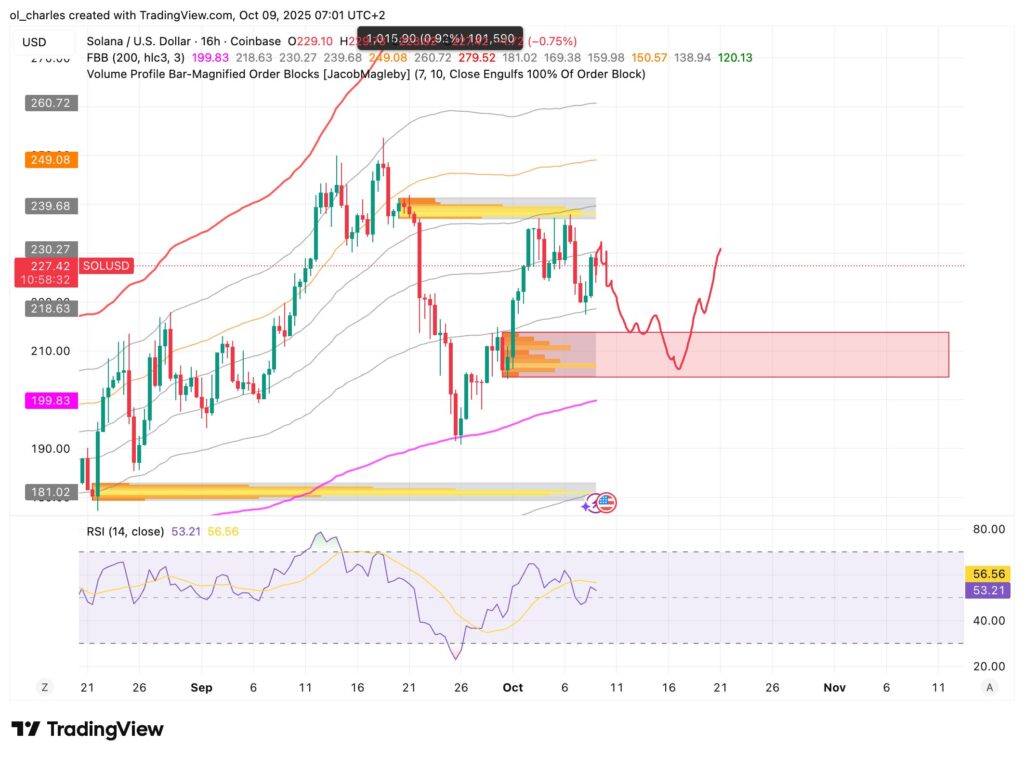
In this context, Solana should correct toward a confluent support level. The 16H SOL chart shows a likely correction between $204 and $213 in the 16H demand zone.
Similar to yesterday’s long position, this trade will only last for a few days, perhaps until next week if nothing happens during the weekend.
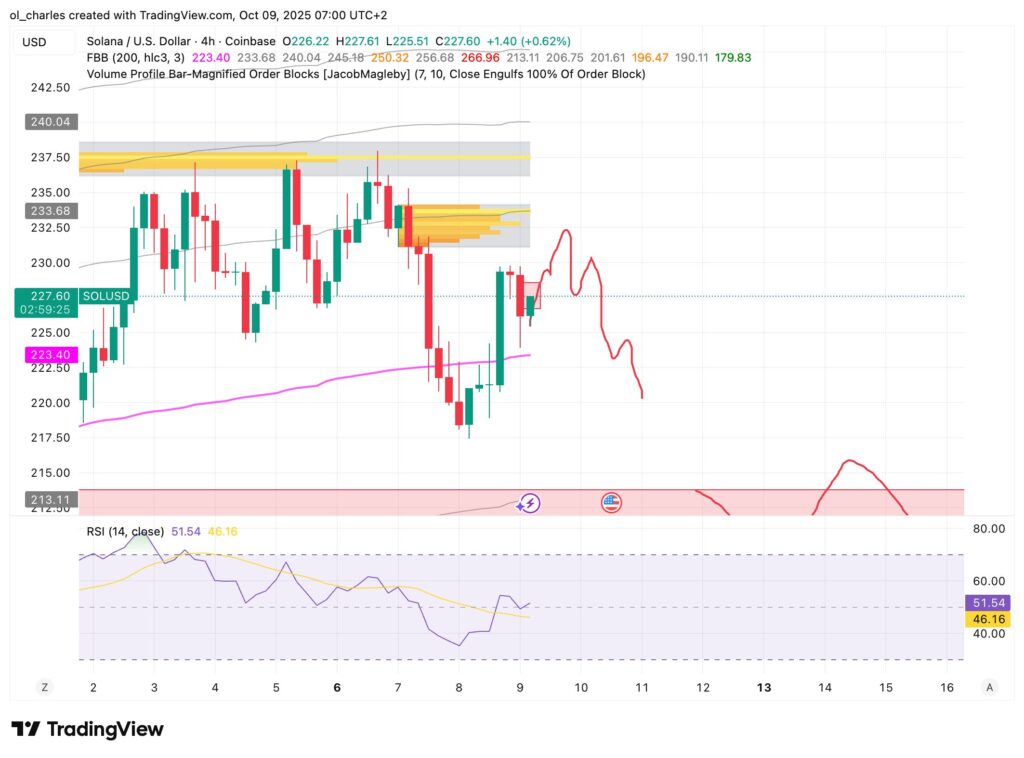
Nevertheless, the 4H chart indicates a potential bounce between $226 and $234 in the coming hours. It’s therefore advisable to enter SOL gradually.
The FBB Bollinger bands on the 30-minute chart are widening, indicating increased volatility. SOL can still bounce in the coming hours with a resistance level at $228.8 to watch closely.
A Short Position to Profit from the Drop
The advantage of short positions is that you can profit from market downturns. Especially to “hedge” your spot positions.
Here’s the short trade to execute on SOL:
- Entry price: between $232 and $226
- Stop loss: $236
- Take profit: between $215 and $204
- Potential gains: Between 50% and 100% with 10x leverage
Remember to adjust your leverage and position size based on what you’re willing to lose if SOL hits your stop loss at $236.
Register on Bitget here to short with $10 bonus:

How to Execute My Short Position?
Here’s how to easily execute your short position on Bitget to potentially gain 100% on your investment:
1: Log in and transfer funds
- Open the Bitget app or go to bitget.com and log in.
- Go to Assets > Spot > Select your spot account.
- Transfer USDT from your Spot account to your Futures account: Click Transfer, choose Spot → Futures, enter the amount, and confirm.
2: Access Futures
- In the app: Tap Futures at the bottom of the screen, then select USDT-M Futures.
- On the web: Click Derivatives > Futures > USDT-M.
- Search and select the SOL/USDT pair.
3: Configure the mode and leverage
- Check the position mode (at the top): Use One-Way Mode for a simple short (or Hedge if you already have long positions).
- Adjust the leverage (on the right): E.g., x10 max (but start low, like x5, to limit risk). Confirm.
4: Open the short position
- Choose the order type: Limit to enter at a specific price (recommended for scaling in gradually).
- Enter the details:
- Entry price: Between $228 and $232 USDT (place multiple limit orders to enter progressively).
- Quantity: Enter the amount in USDT or SOL (e.g., $100 USDT to test).
- Direction: Select Open Short (Sell/Open Short).
- Click Buy/Sell > Confirm to place the order.
5: Set Stop Loss and Take Profit
- Once the position is open (go to Positions to check), click on the TP/SL icon.
- Stop Loss: $236 USDT (type: Stop Market, to automatically close if the price rises).
- Take Profit: Between $204 and $215 USDT (type: Limit or Market).
- Confirm. Monitor in real-time in the Positions tab.
Related topics: